

This page covers frontend connectivity — exposing Cube’s HTTP and SQL APIs
to your applications, browsers, BI tools, embedded analytics clients, and
Semantic Layer Sync-generated configs over a private network. For backend
connectivity (letting Cube reach into your network to query data sources,
auth providers, BI APIs targeted by SLS, and other upstream services), see
AWS PrivateLink or VPC Peering.
Available on the Enterprise plan with Dedicated
Infrastructure or BYOC on AWS. Contact us to enable
private API connectivity for your tenant.
Architecture
Cube runs as two cooperating planes:- The control plane powers the Cube UI and the product surface area
(deployment management, schema editor, dashboards, Semantic Layer Sync,
etc.) and is always served from Cube’s public domain at
https://<customer>.cubecloud.dev. The control plane itself does not need private connectivity — it is a SaaS UI like any other. - The data plane runs your Cube deployments and serves all Cube HTTP and SQL data API traffic — REST/GraphQL queries from your applications, live data calls issued by the Cube UI while rendering charts, SQL connections from BI tools, and AI traffic to the Chat API and other AI endpoints (including data-plane-hosted AI Engineer agents and external agentic clients calling the Chat API as a tool). The data plane is the part that talks to your databases and returns query results, and the part this document teaches you how to expose privately.
*.<cube-region>.cubecloudapp.dev. Because that certificate is bound to the
Cube-managed hostname, you have two options for presenting HTTPS to your own
clients (covered in detail below):
- Re-terminate TLS on your side with your own certificate for the hostname
your clients will dial (
http.cube.internal,cube.example.com, …), forwarding upstream to the HTTP VPC endpoint. - Reuse the Cube hostname privately by setting up an internal DNS override
for
<cube-region>.cubecloudapp.devthat points at the VPC endpoint. Cube’s certificate is then valid for all clients without any additional cert work on your side.
sslmode=require (or equivalent) directly to
the VPC endpoint hostname.
On your side, you create a VPC Endpoint (interface endpoint) in your VPC
that connects to each Cube endpoint service, and bind a DNS name to it that
resolves to the endpoint’s private IPs from inside your VPN-routable network.
Your applications and BI tools then connect to that private hostname exactly
as they would to a public Cube endpoint, except the traffic flows through
PrivateLink instead of the internet.
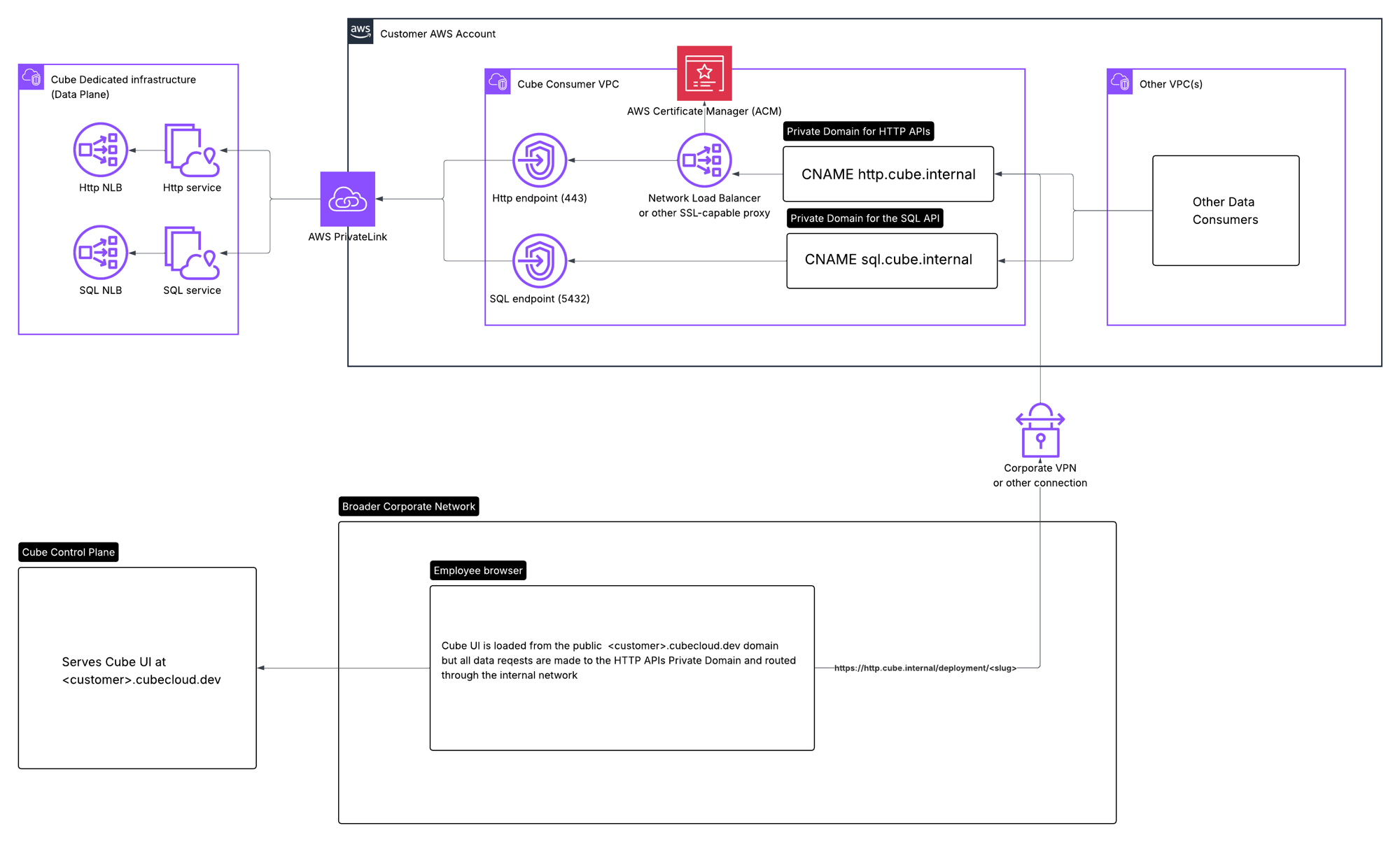
Cube Region
The endpoint services described here are scoped to a Cube Region — the unit of infrastructure that hosts one or more of your deployments. Each region has a stable identifier of the form<provider>-<geo-region>-<infrastructure>
(e.g. aws-us-east-1-t-12345-prod for a single-tenant Dedicated region, or
aws-us-east-1-t-12345-byoc for a BYOC region). The hostname you override on
your side — either privately remapping <cube-region>.cubecloudapp.dev or
fronting it with your own domain — applies to every deployment in that
region. See Cube Regions for the full reference, including
how to find the exact region identifier for your tenant.
How queries are routed
A single private endpoint per region serves all deployments inside that region; there is no per-deployment subdomain or per-deployment endpoint to provision separately.On Cube’s shared, public-facing infrastructure, traffic is routed to a
deployment by subdomain —
<deployment-slug>.<cube-region>.cubecloudapp.dev
maps to a specific deployment. When private connectivity is enabled, Cube
switches to path-based routing so that a single private hostname can serve
every deployment in the region.<deployment-slug> is the leftmost label of the deployment’s Cube-issued
hostname (e.g. thirsty-raccoon from
thirsty-raccoon.aws-us-east-1-t-12345-prod.cubecloudapp.dev). The same prefix
applies to all HTTP endpoints — /cubejs-api/v1/load, /livez, the GraphQL
endpoint, and so on:
TLS options for HTTPS
Cube’s ingress controller can terminate TLS only for the Cube-issued domain*.<cube-region>.cubecloudapp.dev. Pick the option that fits your DNS and
certificate posture:
Option A — Reuse the Cube hostname via private DNS
Create a private DNS zone for<cube-region>.cubecloudapp.dev —
typically a Route 53 private hosted zone associated with
your VPC, or an equivalent override in your corporate resolver — and point the
following records at the VPC endpoints:
| Record name | Type | Target |
|---|---|---|
<cube-region>.cubecloudapp.dev | A | Alias to the HTTP VPC endpoint |
*.<cube-region>.cubecloudapp.dev | A | Alias to the HTTP VPC endpoint |
sql.<cube-region>.cubecloudapp.dev | A | Alias to the SQL VPC endpoint |
*.sql.<cube-region>.cubecloudapp.dev | A | Alias to the SQL VPC endpoint |
*.cubecloudapp.dev — you don’t need to manage a certificate yourself.
This is the simplest setup if you control DNS resolution on the networks your
clients live on. Configure the same hostname in Cube’s admin interface so
that the UI and Semantic Layer Sync generate links and configs against it.
Option B — Front the endpoint with your own domain and certificate
If you’d rather present clients a hostname inside your own domain (e.g.cube.example.com), stand up a customer-side proxy — typically an internal
NLB with a TLS listener bound to a certificate you own, or any reverse proxy
such as nginx, HAProxy, Envoy, or an ALB — that terminates TLS with your
certificate and forwards traffic to the Cube HTTP VPC endpoint. Because
Cube’s ingress only has a cert for *.cubecloudapp.dev, the proxy must do
its own TLS termination; it cannot pass-through your custom-domain TLS to
Cube. Once your proxy is in place, configure its hostname in Cube’s admin
interface so generated links and SLS configs match.
Reaching Cube from every client
The same private hostname is used by three distinct classes of client, and each imposes a requirement on how the name resolves:- Your application servers inside the same VPC as the VPC endpoint resolve the private hostname via the VPC’s DNS resolver and connect over PrivateLink directly.
- End-user browsers loading the Cube UI. When a developer opens
https://<customer>.cubecloud.devand renders a dashboard, the page issues live queries against the Cube data API from the user’s browser. Those calls originate on the user’s laptop, not from a Cube backend, so the URL embedded in the UI must be a hostname the user’s machine can resolve and reach. For this to use PrivateLink, the hostname has to resolve to the VPC endpoint over your corporate VPN’s DNS and route over the VPN to your VPC. A purely internal name that only resolves inside the VPC will fail when the user is on the corporate network but not in the VPC; a public name that resolves outside the VPN will bypass PrivateLink entirely. - Internal BI tools configured by Semantic Layer Sync (SLS). If you publish Cube datasets to BI tools via SLS, Cube generates connection configs that embed the Cube API hostname. Those configs are used by BI desktop clients, BI gateways, or other clients running inside your network — so SLS must be configured with a hostname those clients can resolve and reach over your VPN.
Configuring the private domain
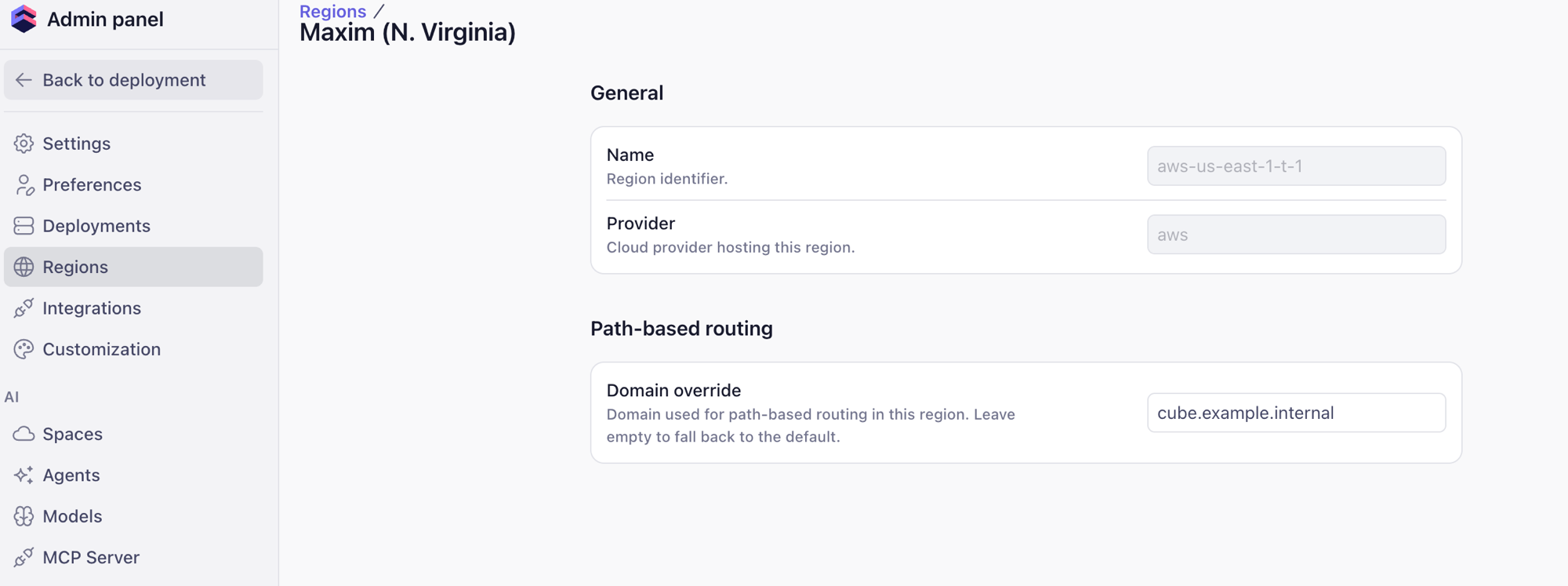
Configure the private hostname for each Cube Region from the Cube admin panel, under Regions → <your region> → Path-based routing → Domain override. The domain override tells Cube where the data plane lives from the caller’s point of view. It does not re-route traffic on Cube’s side and it does not open a new tunnel — it is purely a string Cube embeds when generating outbound references to the data API. Specifically, Cube uses the override value when generating:- Links inside the Cube UI (used by browsers when rendering dashboards and the schema editor — every Cube API call the UI issues goes to this hostname directly from the user’s machine).
- Connection configs generated by Semantic Layer Sync (used by BI desktop clients and gateways inside your network).
- API connection details surfaced to your applications on the deployment’s API page.
http.cube.internal), or the Cube-issued
<cube-region>.cubecloudapp.dev if you went with Option A. Leaving the field
empty falls back to the default public hostname, and clients will not use
PrivateLink even if the endpoint service is connected.
http.cube.internal and sql.cube.internal in the diagram above), since
the HTTP endpoint sits behind your TLS-terminating proxy on port 443 while
the SQL endpoint is accessed directly on port 5432.
Provisioning checklist
- Request PrivateLink for your tenant. Contact Cube and provide your tenant name and the AWS account ID(s) that will create the VPC endpoints.
- Receive endpoint service names. Cube provisions one HTTP and one SQL
VPC Endpoint Service per region and shares the service names
(
com.amazonaws.vpce.<region>.vpce-svc-…) along with the Cube Region identifier. - Create VPC endpoints in your account. In the AWS Console under VPC → Endpoints, create an interface endpoint for each service. Place the endpoint in subnets that are reachable from both your application workloads and your corporate VPN, and attach a security group that allows inbound traffic on 443 (HTTP) or 5432 (SQL) from those clients.
- Accept the connection. Cube accepts the endpoint connection request on the provider side once visibility is confirmed.
- Bind the private hostname. Pick a TLS option above and create the
corresponding DNS records — either a Route 53 private hosted
zone for
<cube-region>.cubecloudapp.dev(Option A) or a single record for your custom hostname pointing at your proxy (Option B). Make sure the records resolve from every network that needs to reach Cube, corporate VPN included. - Set the domain in Cube. In the admin panel under Regions → <your region> → Path-based routing → Domain override, enter the chosen hostname so that Cube generates UI links and SLS configs using that name.
- (Optional) Disable public endpoints. Once private connectivity is verified end-to-end, ask Cube support to disable the public HTTP and SQL endpoints for your deployment.
Availability Zone alignment
Verifying connectivity
From a host inside the consumer VPC or attached to the corporate VPN:Troubleshooting “Network Error” in the Cube UI
When the domain override is configured, the Cube UI stops calling the public Cube data API and starts calling the private hostname you supplied directly from the user’s browser. If that hostname is not reachable from the machine the UI is loaded on, the UI surfaces a red “Network Error” banner on charts, the schema editor, the playground, and any other view that issues data queries — even though direct API calls (e.g.curl from inside the VPC, or your application servers) keep working.
The fix is usually somewhere along the network path between the browser
and the VPC endpoint. Use the browser’s developer tools to pinpoint which
hop is failing:
Open the Network tab in DevTools
Reload the page that shows the “Network Error” banner with the
Network tab open. Filter for
Fetch/XHR requests and look for the
failing call — it will be a request to the private hostname you
configured as the domain override (for example
https://http.cube.internal/deployment/<slug>/cubejs-api/v1/load),
not to *.cubecloud.dev.If the failing request still points at the public *.cubecloud.dev
hostname, the domain override has not been picked up yet — re-check
the value in Regions → <your region> → Path-based routing → Domain
override and reload the UI with cache disabled.Open the failing request URL in a new tab
Right-click the failing request and copy its full URL, then open it
in a new browser tab. This strips the Cube UI out of the picture so
you can see what the browser itself sees when talking to the private
hostname.Common outcomes:
- The page does not load at all / “This site can’t be reached” /
ERR_NAME_NOT_RESOLVED— DNS for the private hostname is not reachable from the user’s machine. Confirm the user is on the corporate VPN, that the VPN pushes the private DNS zone (or that the corporate resolver answers for the override hostname), and that the record points at the VPC endpoint’s private IPs. ERR_CONNECTION_TIMED_OUT/ERR_CONNECTION_REFUSED— DNS resolves but TCP to the VPC endpoint is blocked. Check that the VPN route table covers the VPC CIDR and that the security group on the VPC endpoint ENIs allows 443 from the VPN’s client CIDR.NET::ERR_CERT_COMMON_NAME_INVALID/NET::ERR_CERT_AUTHORITY_INVALID/ browser interstitial about an untrusted certificate — TLS termination is misconfigured. With Option A (reuse the Cube hostname), make sure the private DNS record really is for<cube-region>.cubecloudapp.devso Cube’s*.cubecloudapp.devcertificate matches. With Option B (custom domain), make sure your proxy is presenting a certificate whose CN/SAN matches the override hostname and is signed by a CA the user’s machine trusts.- HTTP 4xx/5xx from Cube — the network path is fine; the error is on the API itself. Inspect the response body in the new tab to see Cube’s error message and proceed as you would for any other API error.
Confirm the same request works from inside the VPC
From a host inside the consumer VPC, run the same request with
curl -v (see Verifying connectivity
above). If it succeeds from the VPC but fails from the user’s
laptop, the data plane is healthy and the problem is strictly in the
VPN → VPC endpoint path for that user.Sanity-check the override value itself
If every request from every machine fails, re-open
Regions → <your region> → Path-based routing → Domain override
and confirm:
- The hostname has no scheme prefix (no
https://) and no path. - The hostname matches the DNS record you actually published.
- For Option B, the hostname matches the certificate on your TLS proxy.
- Clearing the field falls back to the public hostname — useful as a quick smoke test to confirm the UI itself is healthy and the problem is the private path.